 GMacros
GMacros CAD
2D drawing software ready for CNC: the tools you know from AutoCAD and Alphacam, a command line and object snaps. Export your drawing as DXF or open it in GMacros CAM.
The installer is downloaded from the panel; you sign in to the program with your panel email and password.
GMacros CAD is a drawing program only. Toolpaths, simulation, NC code, sheet nesting and macros are in GMacros CAM; the two are separate memberships — buy one or both.
Install on Windows or open in the browser
On Windows, Linux, Android and in the browser — one account. Landscape orientation and a large screen are recommended.
- WindowsDownload from the panel (.exe)
- LinuxDownload from the panel (.deb / .rpm / AppImage)
- AndroidLandscape, large screen recommendedDownload from the panel (.apk)
- iPadComing soonLandscape, large screen recommendedOpen cad.gmacros.com
- BrowserLandscape, large screen recommendedOpen cad.gmacros.com
Draw, fix, dimension, export as DXF
Every step from the first line of a part to its export, in one program.
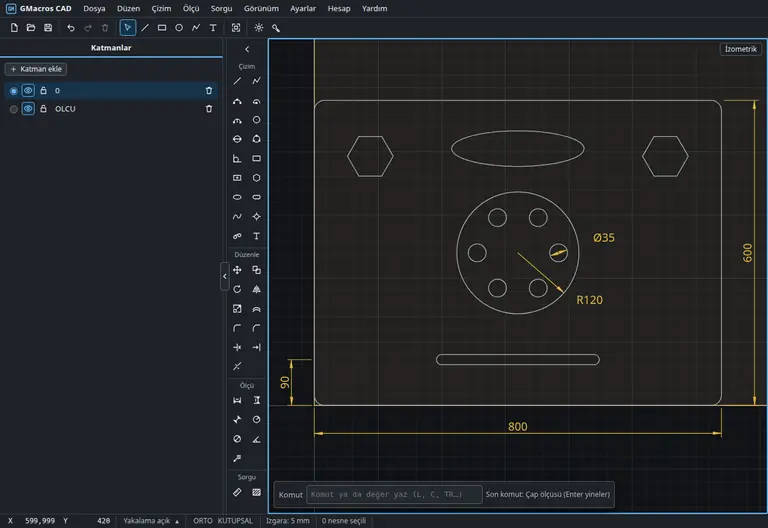
- Draw Draw lines, arcs, circles, rectangles, polygons, slots and curves with the mouse, by touch or by typing values in the command line.
- Snap to the exact point End, mid, center, intersection, perpendicular, tangent and quadrant points snap automatically; lines meet exactly.
- Trim and fillet Trim an overshooting line with one click, extend a short one; add a fillet or chamfer to a corner.
- Dimension Add horizontal, vertical, aligned, radius, diameter and angle dimensions; write notes with leaders.
- Export as DXF Save the drawing as DXF, or open it in GMacros CAM and set up the toolpath there.
Drawings are made of the lines and arcs a CNC understands; nothing breaks on the way to the machine, closed outlines stay closed.
Features
- Drawing: line, polyline, arc (3 points, from center, by radius), circle (2 points, 3 points, tangent), rectangle (with corner radius or chamfer), polygon, ellipse, slot, curve, hole and text
- Editing: trim, extend, break, join, explode, fillet, chamfer, offset (parallel), rectangular and polar array
- Move, copy, rotate, scale, mirror — from a base point to a target point or by exact value
- Union, subtraction and intersection of closed shapes; simplify and remove duplicate lines
- Dimensions: horizontal, vertical, aligned, radius, diameter, angle and notes
- Object snaps (end, mid, center, intersection, perpendicular, tangent, nearest, quadrant), ORTHO and polar tracking
- Command line: AutoCAD shortcuts and Turkish command names; draw by typing values
- Layers, properties panel and grip editing; measure distance, angle, area and perimeter
- DXF import and export, SVG (laser/cutting) and 1:1 PDF output; same document format as GMacros CAM
What it does
Draw the way you are used to
If you have used AutoCAD or Alphacam you will feel at home: the same tool names, the same command shortcuts, the same snapping. Type the command, enter the value, press Enter.
Drawings fit for CNC
Every shape is made of lines and arcs; closed outlines stay closed, duplicate and zero-length lines are cleaned up. Your drawing moves to your CAM program without trouble.
On Windows, Linux, Android and in the browser
Installed on Windows 10/11, Linux (.deb / .rpm / AppImage) and Android, and at cad.gmacros.com in the browser of any device, iPad included. Sign in with the same account everywhere.
Together with GMacros CAM
Open a drawing made in GMacros CAD in GMacros CAM and prepare operations, toolpaths and NC code there. If you use another CAM program, export as DXF.
How to use
- Sign up for free at panel.gmacros.com or sign in.
- Download the Windows installer from the panel's Downloads page, or open cad.gmacros.com in your browser.
- Sign in to the program with your panel email and password; your membership activates automatically. No membership yet? Start the free 7-day trial.
- Draw, save as DXF or open the document in GMacros CAM.
Download or open in the browser
The Windows, Linux and Android installers are on the panel's Downloads page and the browser version needs no installation; you sign in to the program with your panel email and password.
- Windows 10 / 11Download from the panel (.exe)
- Browser and iPadOpen cad.gmacros.com
- Linux and AndroidDownload from the panel (.deb / .rpm / AppImage / .apk)
FAQ
- How much does GMacros CAD cost?
- 50,000 TL + VAT per year. 2–5 year plans and a perpetual plan (250,000 TL + VAT) are also available. The 7-day trial is free.
- What is the difference between GMacros CAD and GMacros CAM?
- GMacros CAD is a drawing program: it draws, edits, dimensions and exports DXF. Toolpaths, simulation, NC code, sheet nesting, macros and AI tools are in GMacros CAM. They are separate memberships.
- Do I need an AutoCAD or Alphacam licence?
- No. GMacros CAD runs on its own; you need no other program to draw.
- Which files does it open and save?
- It imports and exports DXF files and also exports the drawing as SVG (for laser and cutting software) and as 1:1 scale PDF; where DWG is required, DXF opens in CAD programs including AutoCAD. It saves its own document in the same format as GMacros CAM.
- Which devices does it run on?
- Windows 10 and 11 (64-bit) and in the browser at cad.gmacros.com (including iPad), Linux (.deb / .rpm / AppImage) and Android (.apk). Your membership is tied to your account and stays open on one device at a time.
- How do I activate my membership?
- Download the installer from the panel; sign in to the program with your panel email and password and the membership activates automatically.